Checking In/Out Documents
The Document Check In/Check Out feature is useful in a multi-user scenario where multiple users will be working with the same document. Suppose you want to review and make modifications to a document. For example, you want to review a contract or change the design of an image etc. When you know that it is likely to take sometime (a few days for instance) o make these modifications to the document, it is advised to Check-out that document. Once the document is checked out, the status of the document in FileEazy! will be shown as Check Out. Although the document will be allowed to be viewed, no one will be allowed to edit the index fields or delete the document whose status is Check Out. This way all user will know that the document is being modified by some other user. Additionally when the document is checked out by you, no other user can check out the document (and therefore modify it) unless you check in the document or cancel the check out. While a document is in the checked out state, other users can still view the document (as it was at the time you checked it out).
Once the document is ready with the new revisions/changes you can check-in that. All new documents in FileEazy! will be staring with version 1.0. When you check-in a document its version will be automatically increased by 0.1. For e.g. when you check out and check in a document whose version was 1.0, the new version after checking in will be 1.1. You can still view the previous versions of a document by selecting the View Related Documents button  under the Action button(see screenshot below).
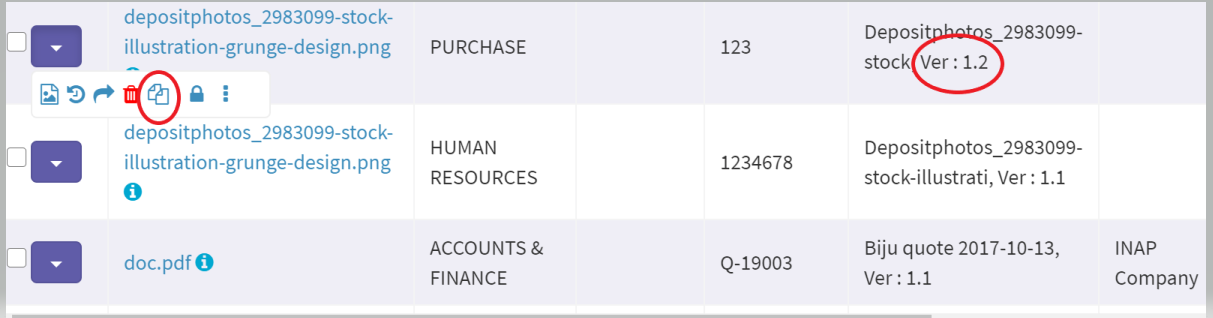
While checking in a document, you can update/modify the index fields of that document including the Document Type of that document.
You can view all the documents that are checked out by selecting the Check Out List menu on the left menu.
Related Topics