Example: Add Document Type
Lets create a Document Type named Proposals with the following fields…
- Proposal ID - Document Number (default field)
- Proposal Name - Document Name (default field)
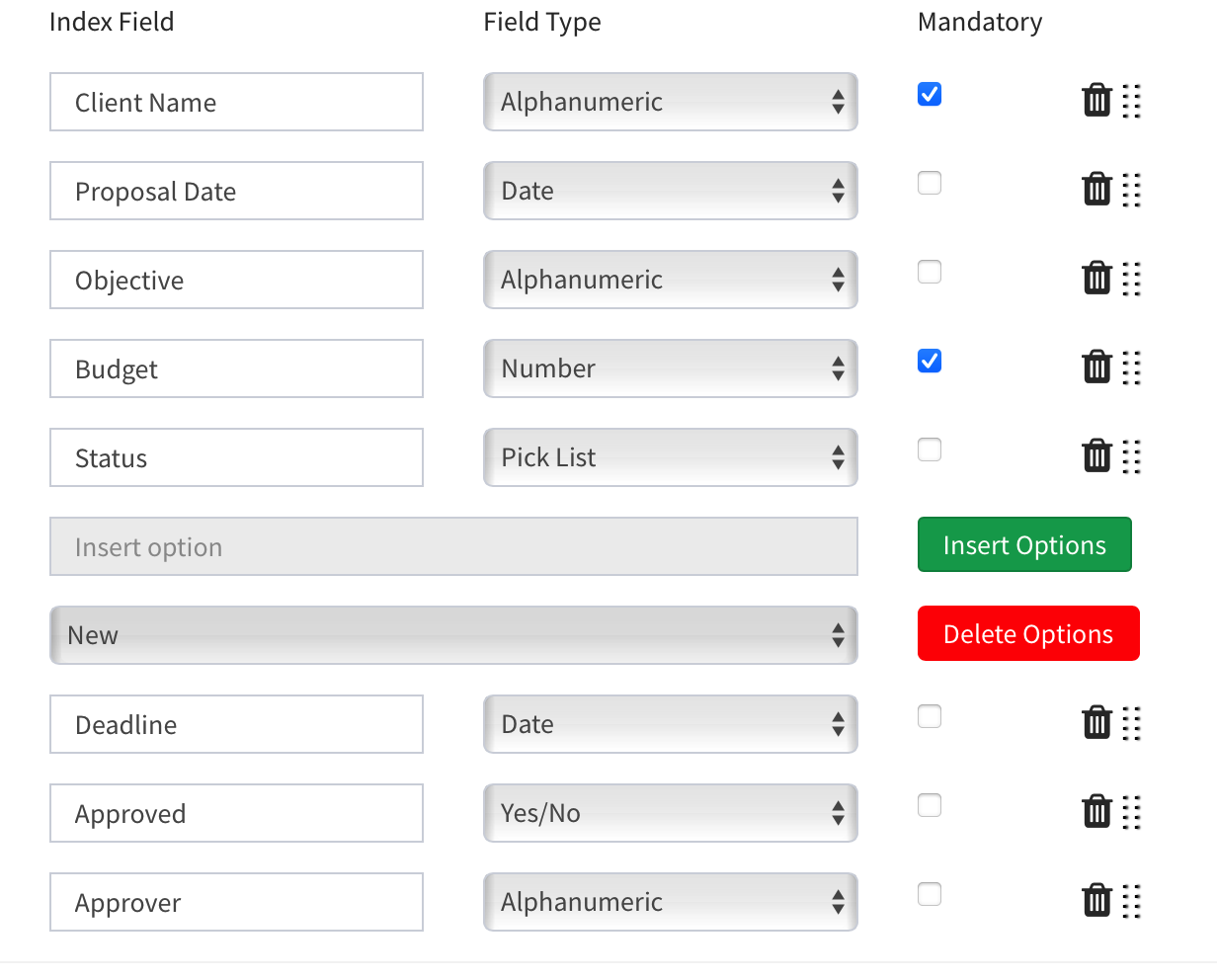
- Client Name - Alphanumeric
- Proposal Date - Date
- Objective - Alphanumeric
- Budget - Number
- Status - PickList (New/Open/Pending/Approved/Rejected)
- Deadline - Date
- Approved - Yes/No
- Approver - Alphanumeric
To create a new Document Type…
- Login to your FileEazy Account
- Click the ‘Add Document Type’ button on the Ribbon bar (top panel).
- Click on the ‘Add New’ button.
- Enter the Document Type Name as ‘Proposals’ in the Document Type textbox.
- Enter a short ‘Description’ in the Description text box.
- Rename the default Document Number and Document Name Field to Proposal ID and Proposal Name.

- Click on Add New Index Field button.
- Enter the Field Name as Client Name, select the Field Type as Alphanumeric. Check the Mandatory checkbox.
- Click on Add New Index Field button.
- Enter the Field Name as Proposal Date, select the Field Type as Date.
- Click on Add New Index Field button.
- Enter the Field Name as Objective, select the Field Type as Alphanumeric.
- Click on Add New Index Field button.
- Enter the Field Name as Budget, select the Field Type as Number. Check the Mandatory checkbox.
- Click on Add New Index Field button.
- Enter the Field Name as Status, select the Field Type as Pick List.
- In the ‘Insert option’ textbox, enter New and click on the Insert Options button.
- Similarly add the values Open, Pending, Approved and Rejected.
- Click on Add New Index Field button.
- Enter the Field Name as Deadline, select the Field Type as Date.
- Click on Add New Index Field button.
- Enter the Field Name as Approved, select the Field Type as Yes/No.
- Click on Add New Index Field button.
- Enter the Field Name as Approver, select the Field Type as Alphanumeric.
- Click on Save.
- You will receive a confirmation message ‘Document Type Proposals saved successfully'.